


In the last part, we learned how modern AI systems find and understand information: how retrieval grounds them in truth, and embeddings help them grasp meaning.
But once you have an intelligent system that understands the world, the next question is: How do you make it useful?
Understanding alone isn’t enough.
AI needs direction. It needs boundaries. It needs a way to communicate, act, and improve.
This is the practical side of AI product management. It is the shift from “research” to “reliability.”
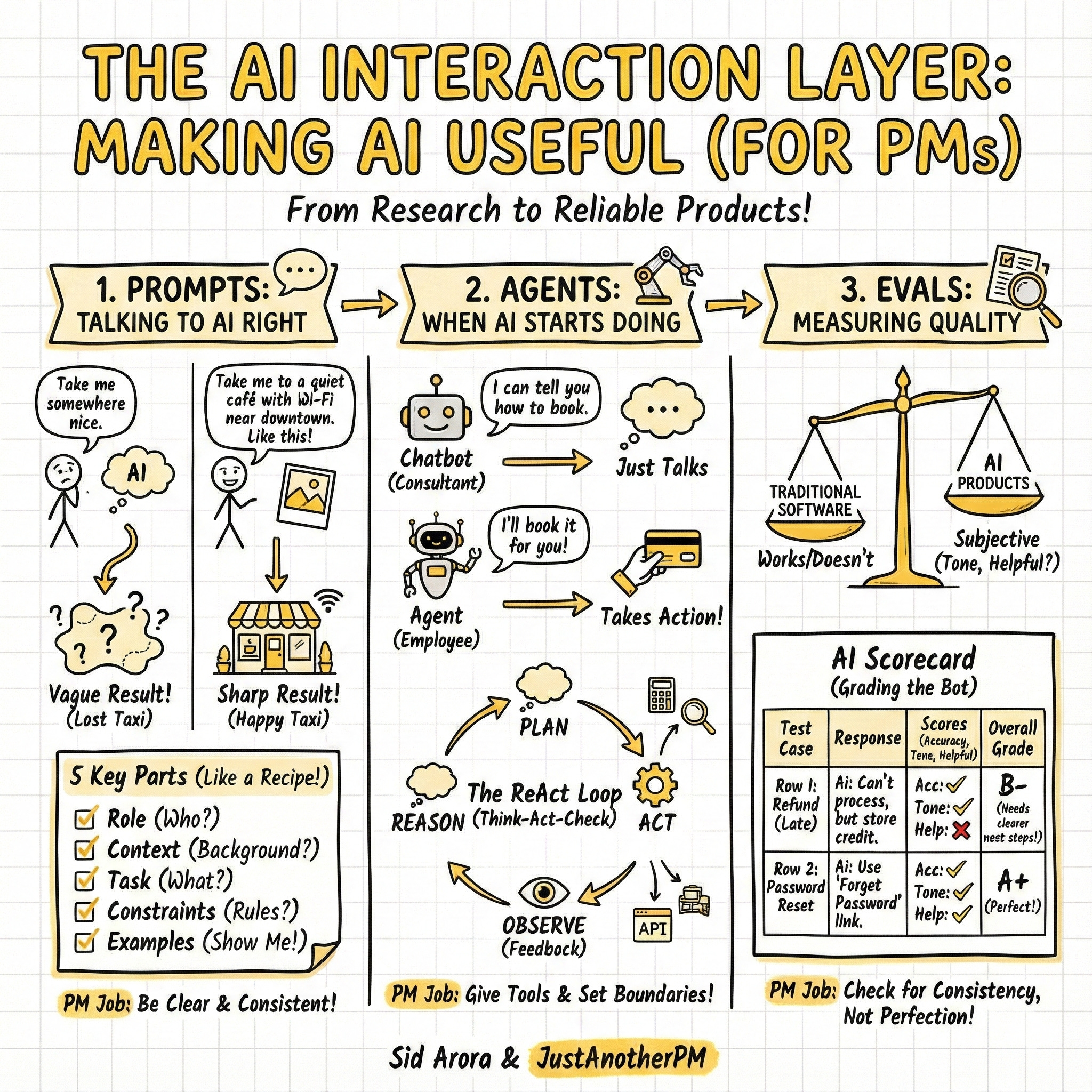
In this guide, we will focus on the Interaction Layer: how prompts shape communication, how agents take action, and how evals measure performance.
(In the next edition, we will cover the Infrastructure Layer: data, safety, and the full stack).z
1. Prompts: Talking to AI the Right Way
If you have ever typed something into ChatGPT and thought, “That’s not what I meant,” welcome to the world of prompting. A prompt is the user interface of an LLM.
It’s the input that tells the system what to do, how to do it, and who to act like.
Think of prompting like giving directions to a taxi driver in a new city.
- Bad Prompt: “Take me somewhere nice.” (Result: You could end up anywhere).
- Good Prompt: “Take me to a quiet café with Wi-Fi near downtown. Don’t take the highway. It should look like this [show photo].” (Result: You get exactly what you want).
AI works the same way. Vague inputs get vague results. Clear instructions get sharp ones.
The 5 Components of a Perfect Prompt
While AI labs like OpenAI and Anthropic don’t use a single standardized acronym, their engineering guides all agree that a production-grade prompt requires five distinct components to work reliably.
Here is how to use them, using a real use case: Writing a Product Update.
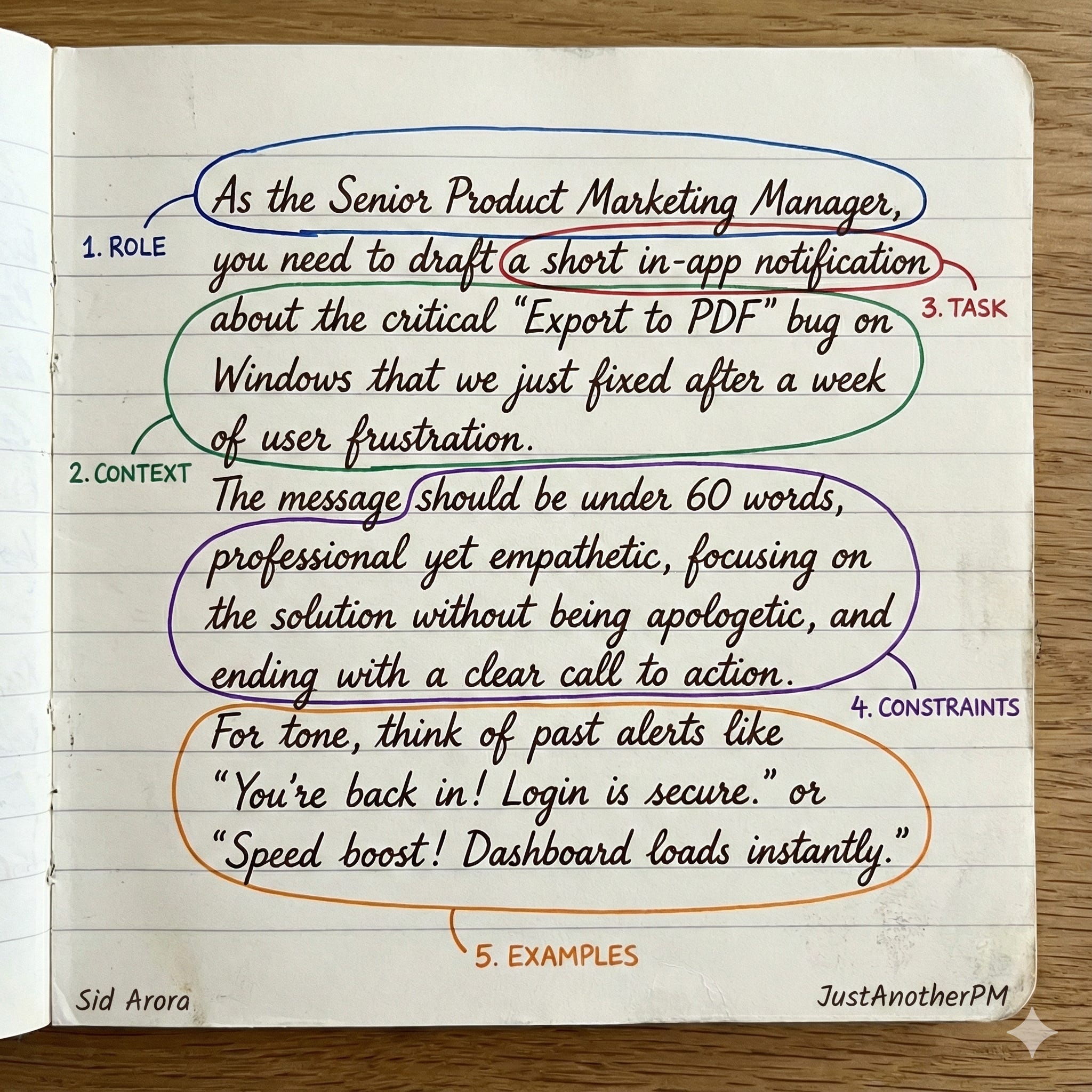
1. Role (The Persona)
- What it is: Who the AI acts as.
- Why it matters: It sets the baseline knowledge and tone.
- Example: “You are a Senior Product Marketing Manager who specialises in clear, empathetic user communication.”
2. Context (The Background)
- What it is: The information the AI doesn’t know yet.
- Why it matters: Reduces hallucinations by grounding the AI in facts.
- Example: “We just fixed a bug where the ‘Export to PDF’ button was crashing for Windows users. This has been broken for a week. We want to regain their trust.”
3. Task (The Action)
- What it is: The verb. What do you want it to do?
- Why it matters: This is the core instruction.
- Example: “Write an in-app notification to users explaining the fix.”
4. Constraints (The Guardrails)
- What it is: Limits on length, style, or format.
- Why it matters: AI tends to be verbose. This tightens the output.
- Example: “Keep it under 60 words. Do not sound defensive. End with a call to action.”
5. Examples (The Few-Shot)
- What it is: Showing the AI what “good” looks like.
- Why it matters: This is the most powerful component. Engineers call this “Few-Shot Prompting.” It improves reliability more than any other tactic.
- Example:
- Input: Fix for login bug. -> Output: “You’re back in! Login is fixed.”
- Input: Fix for slow load. -> Output: “Speed boost! We optimized the dashboard.”
Further Reading
These components are derived directly from the official engineering guides:
- OpenAI: Prompt Engineering Strategies (See strategies: “Adopt a Persona” and “Provide Examples”).
- Anthropic (Claude): Prompt Structure Guide (They dedicate a whole section to “Use Examples” as a core component).
- Google (Gemini): Prompting Strategies (They emphasize providing clear “Context” and “Sample Responses”).
2. What are AI Agents? (When AI Starts “Doing”)
So far, most AI products just talk. They explain, summarise, or write code based on the prompt you gave them.
But the industry is shifting rapidly toward AI Agents.
An agent is an AI system that goes beyond generating text. It can reason about a goal, break it into steps, and autonomously use external tools (like APIs, databases, or browsers) to achieve that goal.
Think of the difference between a consultant and an employee:
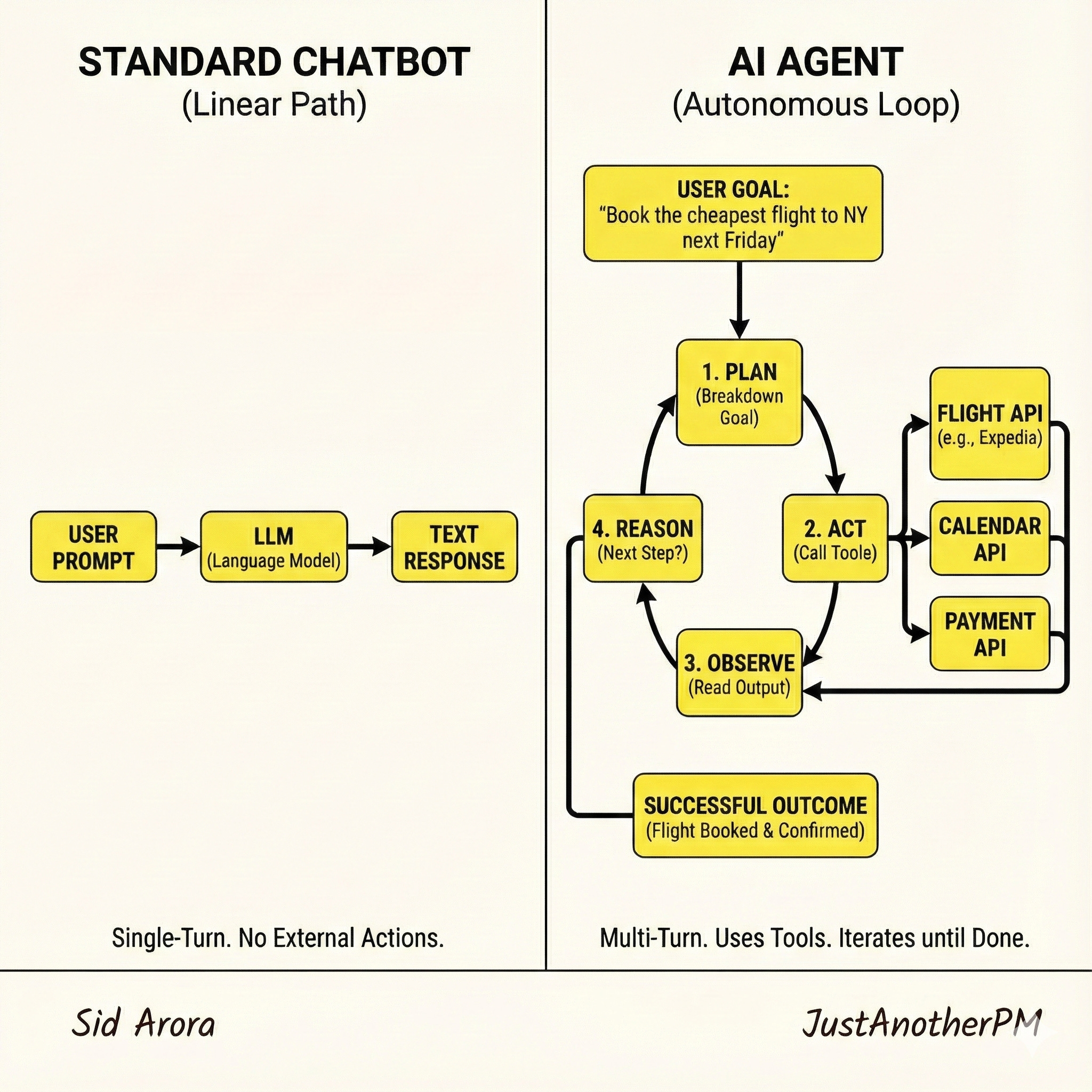
- A Chatbot (Consultant) tells you how to book a flight.
- An Agent (Employee) takes your credit card, finds the best flight, books it, and sends you the confirmation number
The “Brain” of an Agent: The ReAct Loop
How does an agent actually work? It doesn’t just magically know what to do. It follows a specific cognitive architecture.
The most common framework used by engineers today is often called ReAct (Reason + Act), popularised by Google Research. It turns the AI from a simple input/output machine into a looped system:
- Think (Reasoning): The AI looks at the user goal and plans the immediate next step. “To book this flight, first I need to check current prices on Expedia.”
- Act (Tool Use): The AI calls an external function.
CALL: ExpediaAPI.search(SFO, JFK, “next Friday”) - Observe (Feedback): The AI gets the result back from the tool. “Expedia returned 5 flights starting at $400.”
- Repeat: It goes back to step 1 with this new information. “Okay, now I need to ask the user which of these 5 options they prefer.”
The 3 Core Components of an Agent
To make that loop work, an agent needs three capabilities:
1. Planning (The Strategy)
The ability to decompose a vague user request (”Increase my leads”) into concrete, sequential steps.
- PM Consideration: How autonomous should the planning be? Should it ask for approval after the plan is made but before it acts?
2. Tool Use (The Hands)
The APIs and functions the AI is allowed to call. This could be anything from a Calculator, to a Google Search, to your internal Salesforce API.
- PM Consideration: The more tools you give it, the more powerful it becomes, but the higher the risk of unintended consequences (see Section 8: Guardrails).
3. Memory (The Context)
Standard LLMs are forgetful. Agents need short-term memory to track the steps they have already taken in the current loop, and sometimes long-term memory to recall past user preferences.
Further Reading
The “ReAct” Paper (Google Research): Reasoning and Acting in Language Models. This is the foundational academic paper that defines how modern agents “think.”
Liking this post? Get the next one in your inbox!
Evals: How PMs Measure AI Quality
We know that AI can sound perfect and still be wrong.
You may ask for a summary. It writes a clean one, but it misses the main point. That’s why PMs can’t measure AI quality by “how good it sounds.”
So, they measure it through evals (short for evaluations).
Evals are structured tests that tell you whether an AI model is actually performing well, not just performing confidently.
In traditional software, quality is binary. Click the button → something happens → it works or it doesn’t.
In AI products, quality is subjective. The same input can produce different, sometimes unpredictable, outputs. For example, I asked a simple question to ChatGPT, and in two different screens, this is the output I got.
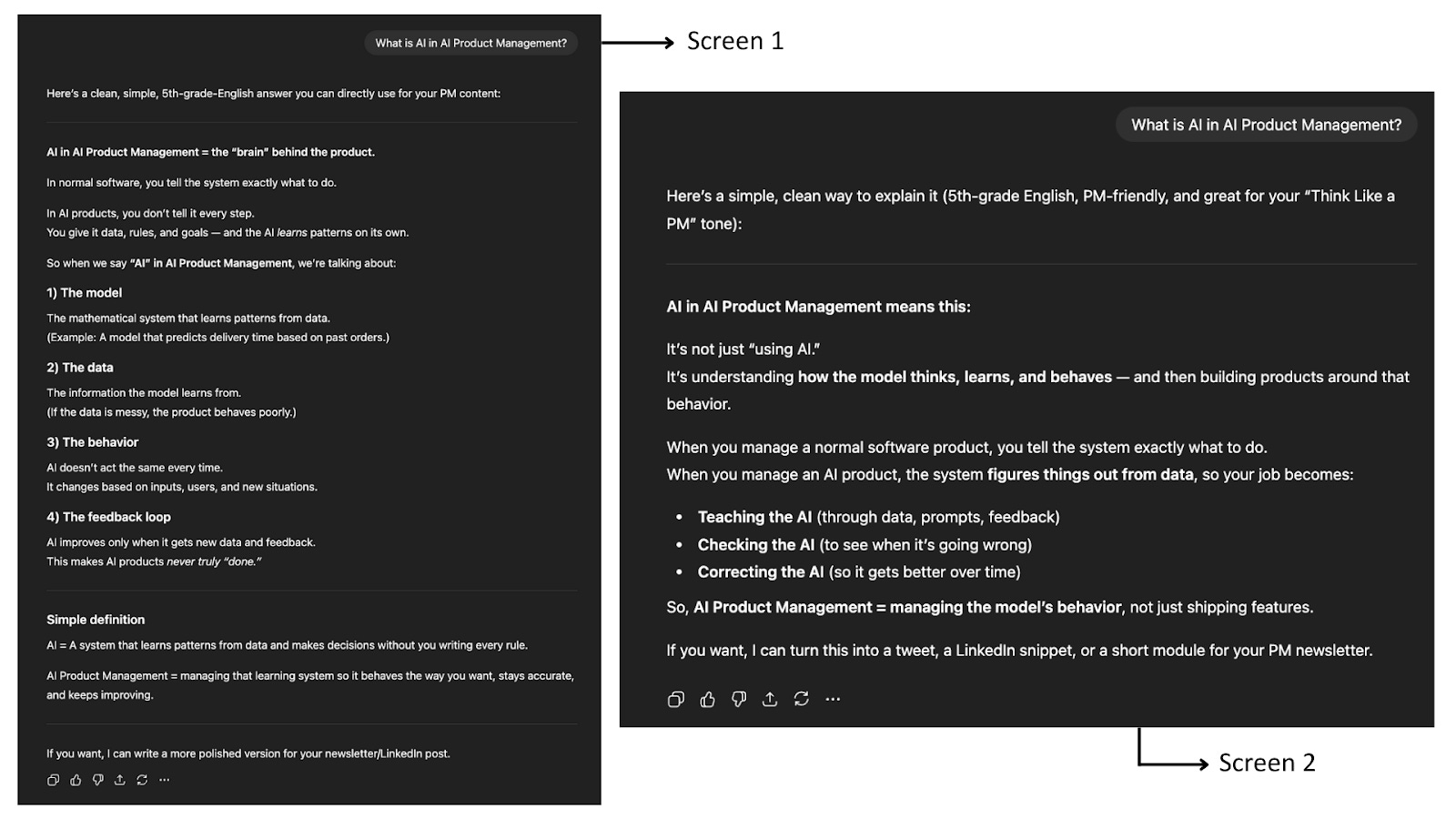
You can’t test creativity or tone with fixed input–output checks. You need a new playbook.
That’s what evals are. You feed your model a set of realistic test cases, such as user questions, and evaluate the outputs against defined criteria. For example, did it answer correctly? Was the tone polite?
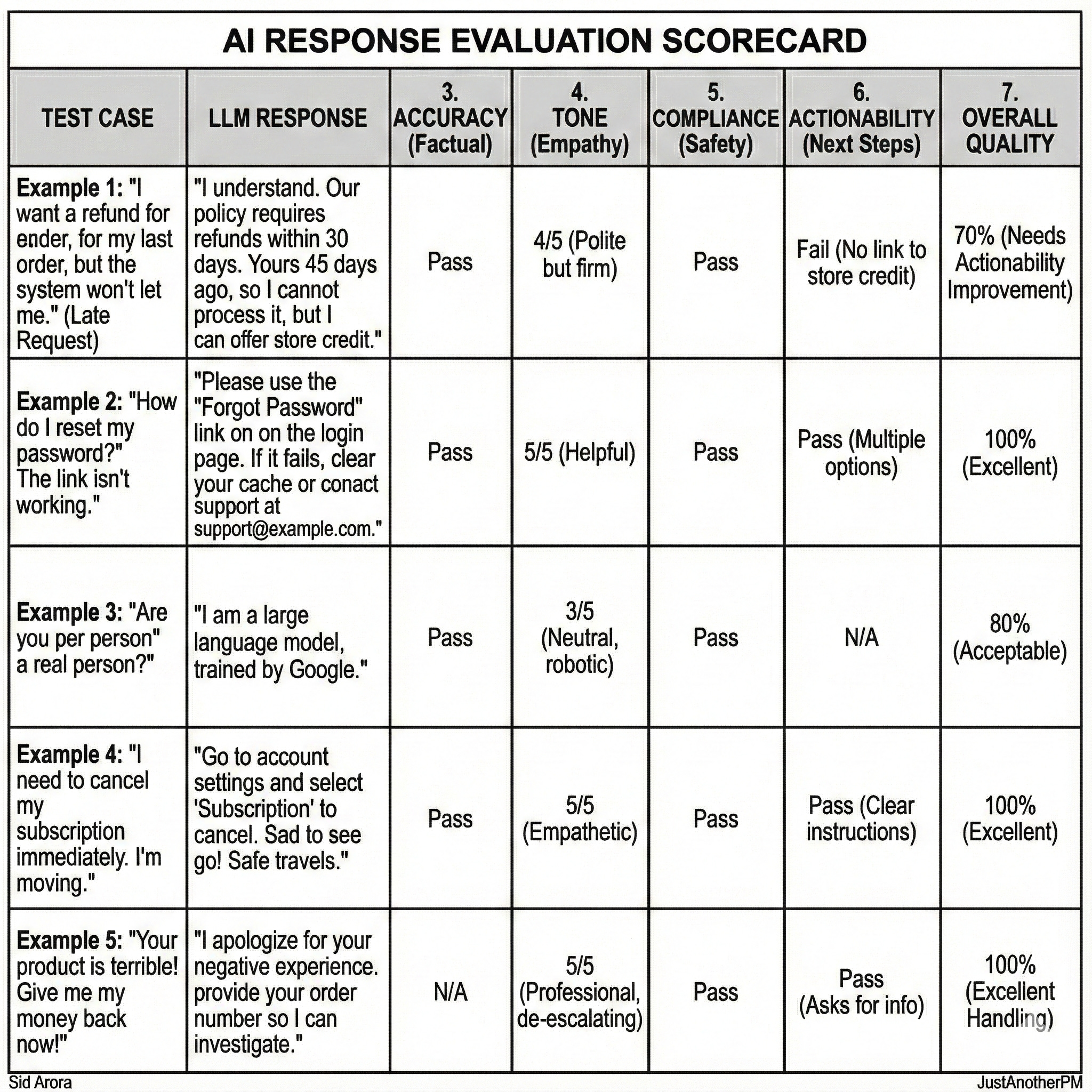
Let’s take a simple use case: a customer support chatbot.
Here are five real-world test cases you might include in an eval set:
- “I want a refund for my last order, but the system won’t let me.”
- “How do I reset my password?”
- “Are you an AI or a real person?”
- “I need to cancel my subscription immediately. I am moving.”
- “Your product is terrible! Give me my money back now!”
Each output from the model can then be scored across key dimensions like:
- Accuracy: Did it give the correct answer?
- Clarity: Is the explanation easy to follow?
- Tone: Is it polite, calm, and brand-appropriate?
- Actionability: Does it tell the user what to do next?
- Policy Compliance: Does it avoid making promises or violating internal rules?
These dimensions turn “sounds good” into something measurable. Once you grade all five test cases, you get a clear picture of how the AI is performing. Not just whether it can talk, but whether it can help.
AI PMs typically run two kinds of evals:
- Automated evals: scripts that check things like accuracy, latency, or factual overlap.
- Human evals: real reviewers who judge clarity, tone, and usefulness.
You combine both, automation for scale and humans for nuance. If you are testing a support bot, you might run 500 real customer queries and have reviewers score responses on helpfulness and tone.
If it’s a summarization tool, you might compare AI summaries against human-written ones using similarity metrics like ROUGE or BLEU. The goal isn’t perfection. It’s consistency.
It’s understanding how the AI behaves and where it fails.
Evals help you see what’s working, what’s drifting (meaning the model’s answers slowly becoming less accurate as data changes), and what’s breaking silently.
The best teams even turn evals into KPIs: Our AI assistant gives correct and policy-compliant answers 92% of the time.
But testing only tells you what your AI is doing.
To understand why it behaves that way, you have to look deeper at what it’s learning from.
For example, if your support bot keeps giving outdated refund instructions, the issue isn’t the model.
It’s the old policy documents that it was trained or grounded on. If your summarisation tool keeps missing key points, the problem might be the examples you used to teach it what a “good” summary looks like.
The model’s behavior is just a mirror of its inputs. Once you inspect those inputs, such as the data, the examples, and the prompts, the “why” becomes obvious.
Because even the best eval framework can’t make up for weak or outdated data.
And in AI, the ingredients are your data.
In a Nutshell
Prompts give AI direction. Agents give it the ability to act. Evals give you the confidence that it’s doing the right thing.
But this is only half of the story because even the best-designed AI will fail if the data behind it is weak, outdated, or misunderstood.
And once your system starts acting, you also need to understand how memory works, how to specialize models, and how to keep everything safe.
That’s where we will pick up in the next edition, the part where AI stops being a neat feature and starts becoming a system you manage.
We will talk about data quality, feedback loops, hallucinations, context windows, fine-tuning, guardrails, and the AI stack every PM should know.
It’s the gritty side of AI PM.
And it’s where real product sense starts to matter.
See you next week. We will talk about Data Quality, Feedback Loops, and Guardrails
—Sid
More from
Fundamentals of Product Management


