


In the last part, we saw how prompts shape communication, how agents take action, and how evals help you measure whether the model is doing the right thing.
But even when all of that works, there’s still a bigger challenge underneath. Why does the model behave differently once real users start using it?
That’s the part most PMs feel but can’t always articulate. Models drift. Answers change. Tone shifts. Facts get outdated. And suddenly, the same system that looked perfect in testing starts breaking in small, subtle ways.
This part is about understanding why that happens.
It’s where we look at the foundations, the data the model learns from, the feedback loops that shape its behavior, the limits of memory, the tradeoffs in model size, and the guardrails that keep everything safe.
The previous part in this series was about how AI communicates and acts, and this part is about what keeps it stable, accurate, and trustworthy over time. This is the side of AI PM work that turns a good model into a dependable product.
Data Quality, Feedback Loops, and Hallucinations
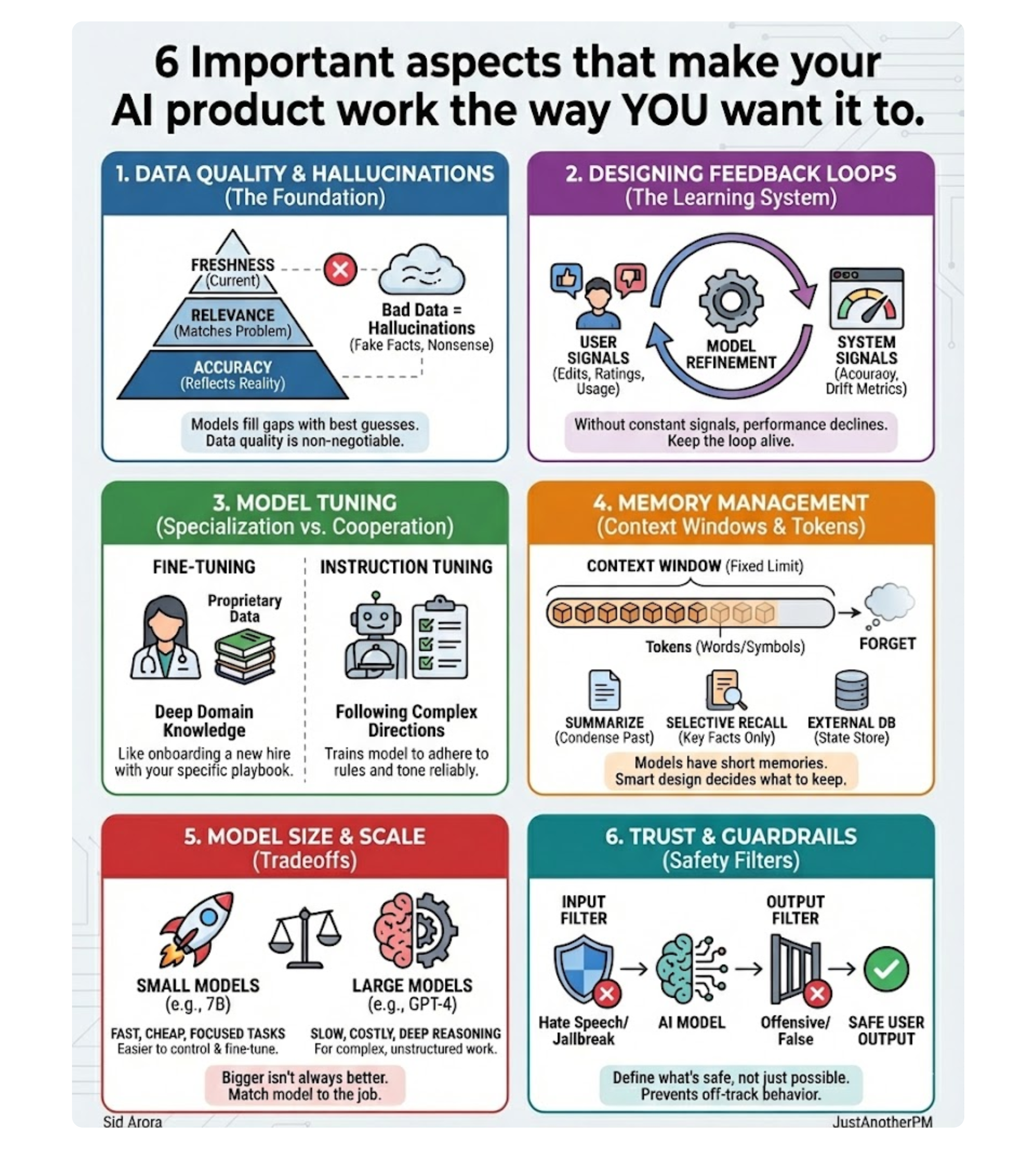
Every model, no matter how advanced, is only as good as the data it’s trained and fed on.
If the data is incomplete, biased, or outdated, the model may appear confident yet still be wrong. That’s why data quality is the foundation of AI reliability. Good data has three non-negotiable traits:
- Accuracy: It reflects reality.
- Relevance: It matches the specific problem you’re solving.
- Freshness: It stays current with the world.
If you train a support bot on last year’s policy docs, it will explain last year’s rules with this year’s confidence.
That’s how hallucinations start.
They don’t stem from bad math, but from bad or missing data. And because models don’t know what they don’t know, they fill in the gaps with their best guess—creating fake restaurants, false facts, and flawless nonsense.
The Real Magic: Designing Feedback Loops
That’s why feedback loops are the real magic of AI products. Feedback is how your system learns what “good” looks like. Every rating, correction, or click refines the model’s behavior.
There are two critical kinds of feedback loops you must design for:
- User feedback: Explicit (like thumbs up/down) or implicit (like edits, usage time, or task completion).
- System feedback: Model performance metrics, such as accuracy, confidence scores, and drift detection.
Good teams design for both. They constantly retrain, adjust prompts, or fine-tune models based on those signals. Without regular updates, a model’s performance slowly declines as the world, users, and data change.
As data gets stale, context shifts, and behavior drifts. Your job as a PM is to keep the loop alive:
- Monitor data freshness aggressively.
- Capture user corrections immediately.
- Feed them back into training systems intelligently.
But sometimes, feedback loops aren’t enough.
You might need the AI to speak in your brand’s tone, follow your rules precisely, or understand your industry at an expert level. That’s where the next step comes in. Not just learning from data, but training with purpose.
Specialization vs. Cooperation: Fine-Tuning and Instruction Tuning
Most AI models start as generalists.
They can summarize text, write code, and explain memes easily. That’s a bit of everything.
But when you need them to sound like your brand or adhere to compliance rules, general knowledge isn’t enough.
Fine-Tuning: Specialization
Fine-tuning is about training an existing base model on your own proprietary data so it performs better on your specific tasks. Think of it like onboarding a new hire. They already know the fundamentals.
Now you teach them your specific playbook. A base model knows what “customer support” means. A fine-tuned model remembers your specific refund policies, tone, and workflows.
You are not teaching everything from scratch; you are refining what it already knows.
PM Note: Fine-tuning costs time, money, and maintenance. If your primary use case depends only on factual accuracy or fresh data, you are often better off using RAG (Retrieval-Augmented Generation).
Instruction Tuning: Cooperation
Instruction tuning is different. Instead of teaching the model new knowledge, you teach it how to follow directions better.
Imagine two assistants: one knows everything but ignores half your instructions.
The other listens carefully and adapts to your tone. Instruction tuning builds the second one. It trains models on thousands of “prompt → response” examples so they respond more naturally and coherently to human instructions.
Method: Fine Tuning
Goal: Domain Expertise (Knowledge)
Output: Specialization
Product Decision: Use if you need a model to know your domain deeply.
Method: Instruction Tuning
Goal: Task Behavior (Adherence)
Output: Cooperation
Product Decision: Use if you need the model to follow complex, multi-step instructions reliably.
For PMs, knowing when to use each is a core product decision.
Memory Management: Context Windows and Tokens
If you have ever had ChatGPT “forget” something you said a few minutes ago, it’s not being rude. It just ran out of memory. AI models don’t actually remember as humans do.
They rely on a context window: a fixed amount of text they can see and process at once.8 Every word, symbol, or punctuation mark counts as a token.
Tokens are the building blocks of language for AI (roughly, one token 9$\approx$ four characters).10
Every model has a limit. GPT-4 Turbo can handle about 128K tokens (a 300-page book). Once you exceed that limit, the model forgets the oldest parts of the conversation, just like writing over old notes on a whiteboard.
That’s why long chats sometimes lose context or contradict earlier answers. It’s a short memory.
Designing for Smart Memory
When PMs design AI products, context management becomes critical. You decide what the model should remember, what to summarize, and what to forget. Here’s how effective teams handle it:
- Summarization: Condense past messages into a shorter memory chunk before feeding it back into the prompt.
- Selective Recall: Store only key facts or explicit user preferences, not every single message.
- External Memory (State): Save structured data elsewhere (e.g., a database) and retrieve it only when needed for the next turn.
The goal is to make it remember the right things. A customer support bot doesn’t need your full chat history from six months ago; it just needs to know your current issue, your tone, and whether it’s been resolved before.
Smart memory design doesn’t just make the model faster; it makes it feel intelligent.
Scaling Decisions: Model Parameters and Model Size
When a new model launches, the first thing everyone asks is, “How big is it?”
But bigger doesn’t always mean better for your product.
A parameter is a model’s internal setting—a tiny dial that adjusts how it interprets data. Large models have billions (sometimes trillions) of these, allowing them to capture complex relationships.
That’s why bigger models (like GPT-4) can handle nuanced instructions. However, large models come with tradeoffs: they are slower, more expensive to run, and often generate more text than you need.
In many real-world cases, smaller models (like Mistral 7B or Gemma 2B) outperform larger ones because they are faster, cheaper, and easier to fine-tune for focused use cases (e.g., a chatbot that only answers FAQs).
The PM's Mental Model for Model Choice
Model Size: Small
Characteristics: Fast, cheap, easy to control.
Best for: Focused tasks (classification, short commands).
Model Size: Medium
Characteristics: Balanced performance and cost.
Best for: General applications and high-traffic features.
Model Size: Large
Characteristics: Deep reasoning, high creativity.
Best for: Complex, unstructured work (code generation, long-form content).
The future is modular. Smart PMs are learning to mix and match: one model for reasoning, another for retrieval, and another for classification. An AI support assistant, for example, might use three different models, each doing the part it’s best at. In AI, scale is only an advantage when it actually serves the user.
Liking this post? Get the next one in your inbox!
Trust and Safety: Guardrails and Safety Filters
“Our model said what to the user?” AI is powerful and unpredictable.
That’s why every serious product needs guardrails. Guardrails are the systems that keep AI from going off track, saying something wrong, biased, unsafe, or just plain weird.
They make AI safer. The best way to think about guardrails is like permission controls. They define what the AI is allowed to say or do, and they block anything outside those limits.
There are two kinds of guardrails every PM should know:
- Input filters: what the user can send in. These catch unsafe or irrelevant prompts. It includes things like hate speech, personal data, or jailbreak attempts (“ignore all previous instructions…”). Input filters stop the problem before it starts.
- Output filters: what the AI can send out. These review and sometimes rewrite model responses to remove anything offensive, false, or private. It’s the last line of defense between the model and your user.
Good products use both.
For example, a healthcare chatbot should never give medical advice beyond its scope.
A guardrail might block it from diagnosing diseases, recommending medications, or interpreting lab results. It can only provide general information or direct the user to a doctor.
The other day, I tried to recreate an image from online on ChatGPT. And this was the output:

The guardrail here is that ChatGPT should not generate copyrighted characters exactly as they appear in movies.
So instead of giving me the same “Gru” meme, it stopped the request, explained why, and offered an alternative that followed the rules.
That’s a guardrail in action, a safety check that prevents the model from doing something it technically can do, but shouldn’t do. These rules are product design decisions.
As a PM, your job is to define what’s safe, not just what’s possible. That means asking:
- What kind of tone should our AI always avoid?
- What topics should it never answer?
- What data can it access and what’s off-limits?
You can build these guardrails in multiple ways:
- Pre-prompting: giving the model safety instructions every time.
- Post-processing: scanning outputs before they reach users.
- Human review: routing risky cases to a real person.
The goal is to protect trust. From data to prompts, from retrieval to filters, every AI product runs on a stack. And once you understand that stack, AI stops feeling like a mystery and starts feeling like a system you can manage.
Getting it all together:
The AI Stack Every PM Should Understand
At first, AI feels like a black box. But once you break it down, it’s just a stack, each layer with a clear job. Here’s the simple picture:
1. Data → The foundation. What the model learns from.
2. Model → The brain. It predicts, generates, or classifies.
3. Context → What you feed it at runtime (like documents or user inputs).
4. Prompting → How you talk to it. Your interface for control.
5. Guardrails → What keeps it safe and aligned.
6. Feedback Loops → How it learns and improves over time.
Every AI product you use runs on some version of this stack.
As a PM, your job isn’t to master every layer. It’s to understand how they fit together, so when something breaks, you know which layer to fix. Because once you see AI as a stack, it starts feeling manageable.
In a Nutshell
AI isn’t magic. It’s a system with a set of layers that talk, learn, and adapt together. Prompts give it direction. Agents give it hands. Evals give it a mirror. Data keeps it grounded. Guardrails keep it safe.
Every choice you make as a PM, from what model to use and how much memory to give it to what tone it should take, shapes how intelligent your product feels.
The best AI PMs aren’t the ones who know every technical detail.
They are the ones who can connect those details into decisions that serve users. So before you build the next workflow, pause and look at the stack beneath it. The prompts, the data, the guardrails, the feedback loops.
That’s where good AI products are born, not from the model itself, but from how thoughtfully it’s managed.
Because at the end of the day, AI needs better product sense, not algorithms. And that’s your job.
More from
Fundamentals of Product Management


